
Managing your daily routine can be challenging when you have multiple classes, meetings, assignments, or work shifts. A well-organized timetable helps you stay productive, avoid scheduling conflicts, and make the best use of your time.

To simplify weekly planning, Civil Construction Guide offers a Free Timetable Creator that enables students, teachers, professionals, coaching institutes, schools, and businesses to create customized weekly schedules in just a few minutes.
Whether you need a class timetable, study planner, work schedule, tuition timetable, or personal weekly planner, our online tool allows you to design a clean and organized timetable without installing any software.
Discover More
Property Tax Calculator Unit Converter Quantity Takeoff Sheets Construction Cost Calculator Building Materials House Plans Videos Concrete Calculator Column Steel CalculatorWhat is a Timetable Creator?
A Timetable Creator is an online scheduling tool that helps users organize their weekly activities in a structured format.
Instead of creating schedules manually using paper or spreadsheets, the tool allows you to quickly add subjects, meetings, classes, tasks, and activities into a professional timetable that can be edited, printed, or downloaded.
Modern timetable tools typically support customizable days, time slots, color coding, and export options for printing or sharing.
Why Use an Online Timetable Creator?
A timetable improves productivity by helping you manage your time effectively.
Benefits include:
- Better time management
- Organized daily routine
- Improved productivity
- Reduced stress
- Easy schedule editing
- Printable layouts
- Mobile-friendly planning
- Professional appearance

Whether you are preparing for exams or managing office meetings, a timetable helps you stay focused.
Who Can Use This Tool?
Our Timetable Creator is suitable for:
- Students
- Teachers
- Schools
- Colleges
- Universities
- Coaching Centers
- Tuition Academies
- Office Employees
- Freelancers
- Business Teams
- Parents
- Fitness Trainers
Discover More
Material Rates Grey Structure Material Prices Plaster Calculator PCC Concrete Calculator Block Masonry Calculator Statistical Bulletin 2026 Civil Engineering Calculators Finishing Material Prices Sanitary Material PricesFeatures of Our Timetable Creator
Our online tool is designed to be simple yet powerful.
Easy to Use
No technical knowledge is required.
Fully Customizable
Add your own subjects, activities, or meetings.
Weekly Planning
Organize your schedule from Monday to Sunday.
Printable Timetable
Print your timetable for classroom, office, or home use.
Mobile Friendly
Works perfectly on desktops, tablets, and smartphones.
Fast Performance
Create a professional timetable within minutes.

How to Use the Timetable Creator
Creating your timetable is simple.
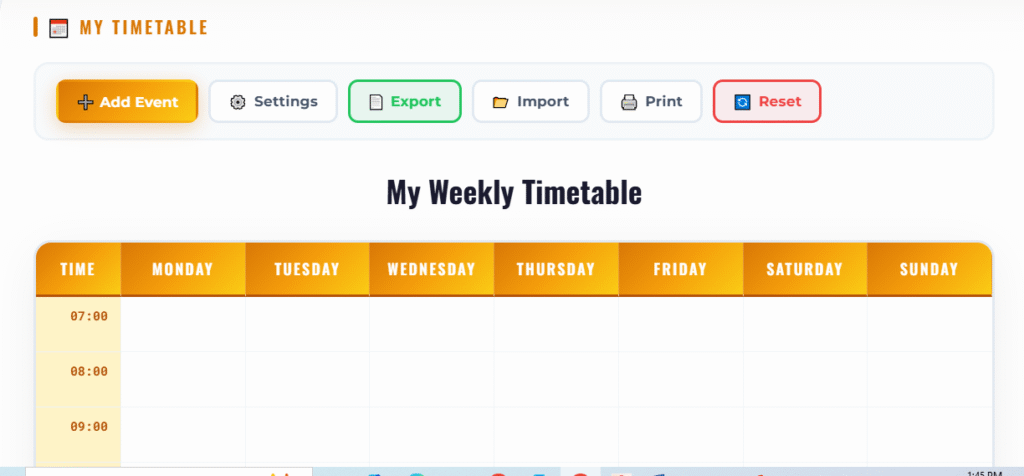
Step 1 – Open the Tool
Visit the Timetable Creator on Civil Construction Guide.
Step 2 – Enter Basic Information
Depending on your timetable, enter details such as:
- School Name
- College Name
- Office Name
- Class
- Department
- Academic Session
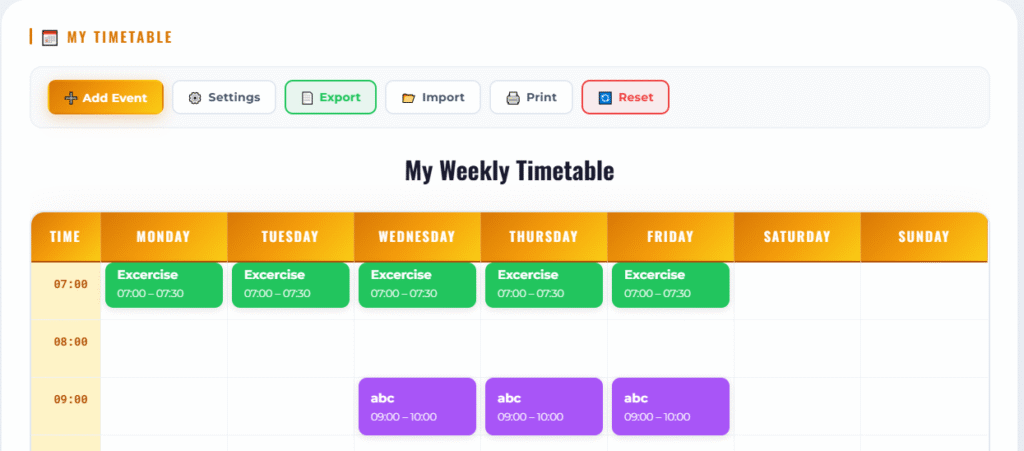
Step 3 – Add Days
Select the working days you want to include.
Examples:
- Monday
- Tuesday
- Wednesday
- Thursday
- Friday
- Saturday
- Sunday
Step 4 – Add Time Slots
Enter the timing for each lecture, meeting, class, or activity.
Discover More
Property Tax Calculator Unit Converter Quantity Takeoff Sheets Construction Cost Calculator Building Materials House Plans Videos Concrete Calculator Column Steel CalculatorExamples:
- 8:00–9:00
- 9:00–10:00
- 10:00–11:00
Step 5 – Enter Activities
Fill each slot with relevant information such as:
- Mathematics
- English
- Physics
- Chemistry
- Office Meeting
- Gym
- Study Time
Step 6 – Customize
Adjust colors, layout, or formatting (if supported by the tool).
Step 7 – Save or Print
Download or print your completed timetable for everyday use.
Types of Timetables You Can Create
- School Timetable
- College Timetable
- University Timetable
- Study Planner
- Teacher Schedule
- Tuition Timetable
- Office Work Schedule
- Employee Shift Schedule
- Gym Workout Plan
- Meal Planner
- Daily Routine
- Weekly Planner
Benefits of Planning Your Week
Using a timetable can help you:
- Improve productivity
- Balance work and study
- Meet deadlines
- Reduce procrastination
- Build consistent habits
- Improve academic performance
- Save time
- Reduce scheduling conflicts
Tips for Creating an Effective Timetable
- Prioritize important tasks.
- Include short breaks.
- Avoid overloading your schedule.
- Keep study sessions realistic.
- Review and update your timetable weekly.
- Use color coding for better readability.
- Allocate time for exercise and relaxation.
Frequently Asked Questions
Is the Timetable Creator free?
Yes. Our Timetable Creator is completely free to use.
Can I create a school timetable?
Yes. It is ideal for schools, colleges, and universities.
Can teachers use this tool?
Absolutely. Teachers can organize lectures and weekly teaching schedules.
Can I print my timetable?
Yes. The generated timetable is designed to be print-friendly.
Can I use it on mobile?
Yes. The tool works on mobile phones, tablets, laptops, and desktop computers.
Is registration required?
No. You can start creating your timetable without complicated setup.
Related Tools
Why Choose Civil Construction Guide?
Civil Construction Guide provides practical online calculators, educational resources, engineering guides, and productivity tools to simplify everyday tasks. Our free tools are designed to save time, improve accuracy, and help students, professionals, and homeowners make informed decisions.
Conclusion
A well-planned timetable is one of the simplest ways to improve productivity and stay organized. Whether you’re a student managing classes, a teacher preparing weekly lessons, or a professional planning meetings, our Free Timetable Creator makes scheduling fast and convenient.
Visit the tool today, build your personalized timetable, and take control of your weekly routine with a clean, organized schedule.

Muhammad Bilal is a Civil Engineer and Construction Specialist with an MS in Engineering Management and 13+ years of professional experience. He shares practical construction knowledge, cost estimation, and RCC site expertise at CivilConstructionGuide.com.
𝓢𝓮𝓷𝓭 𝔂𝓸𝓾𝓻 𝔀𝓱𝓪𝓽 𝓪𝓹𝓹 𝓷𝓾𝓶𝓫𝓮𝓻 𝓪𝓭𝓭🔗 𝓶𝓮 𝓷𝓾𝓶𝓫𝓮𝓻 03336005382